
Security & threats
The Security tab shows what's being kept away from your site. It's honest about what each layer actually does — which requests are refused outright, and which numbers are estimates — so you always know exactly what protection you have.
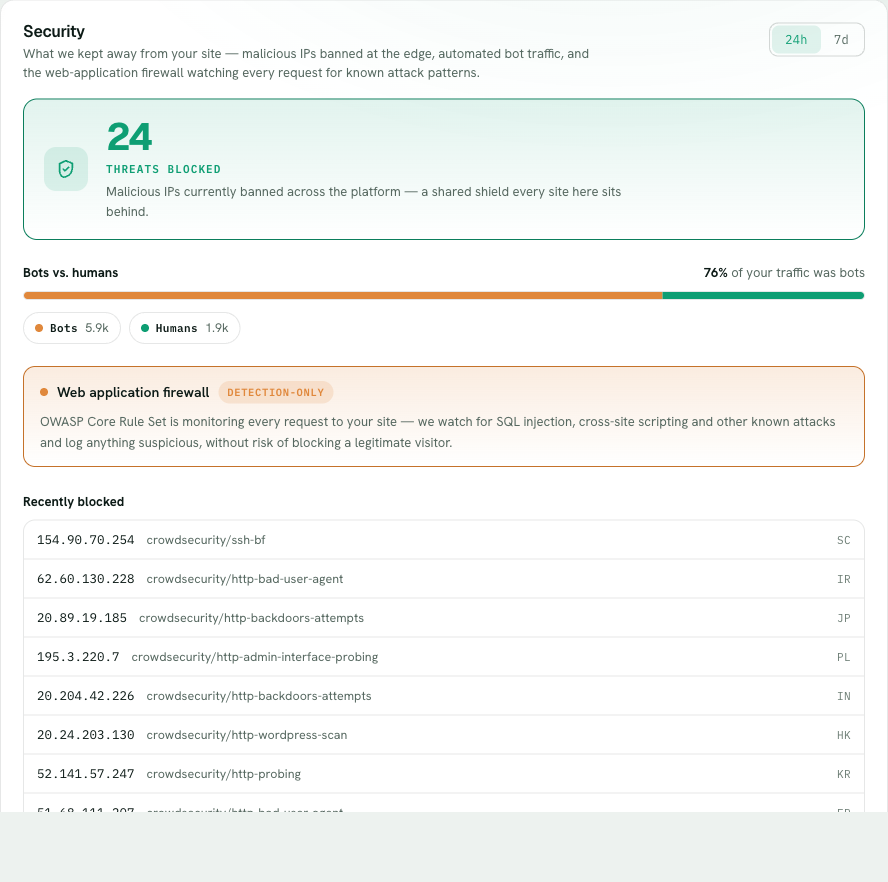
The strongest layer is a real block. CrowdSec bans abusive IP addresses at the network layer — an address caught behaving badly (credential-stuffing, hammering login, scanning for exploits) is dropped before its requests reach your site at all. The tab shows the active-ban count, labelled platform-wide because the protection is shared across everyone on Belov Cloud, alongside a list of recently-blocked IPs with the country each came from.
- Open the Security tabOn the site, click Security. The active-ban count and recently-blocked IPs are the first thing you see.
- Read the CrowdSec bansThese are real network-layer blocks. The count is platform-wide; the recent list shows individual IPs with their country, so you can see who's being turned away right now.
- Review what the firewall flaggedThe OWASP rule set lists requests that matched an attack pattern. These were refused with a 403 before reaching your site — the list is a record of what was stopped, and a useful read on what is currently probing you.
- Check the bot-vs-human splitAn estimate of how much of your traffic looks automated versus human. It's a heuristic read of the User-Agent each request sent — a useful signal for spotting a bot wave, not a definitive identity check.
Want the full picture of the security stack — WAF, DDoS shielding, container isolation — and what each layer actually does?
How we secure your site →