
Traffic & cache analytics
Every site has an Analytics tab that reads your real edge traffic — not an estimate bolted on afterwards, but the requests that actually hit Belov Cloud. It answers two questions at a glance: how much traffic am I getting, and how much of it is being served fast from cache?
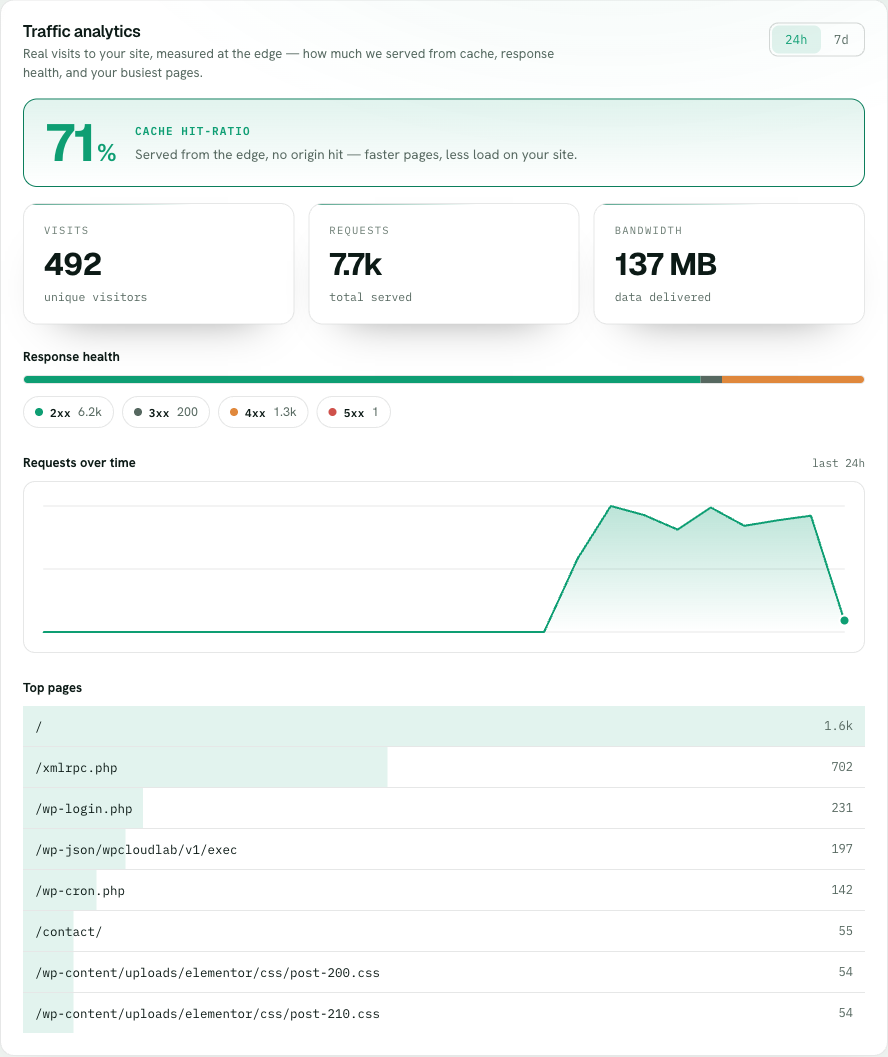
The headline number is your page-cache hit-ratio: the share of requests served straight from the edge page cache without ever touching your origin. It leads the tab because it's the number that most affects how your site feels. A request served from cache comes back in milliseconds and never wakes up PHP or your database. A miss has to run the page — but not from scratch: every WordPress site also has its own object cache holding the database work WordPress repeats on each request, so the requests that can't be page-cached still do far less work than they would on a plain host.
- Open the Analytics tabOn the site, click Analytics. Pick the window you want — the last 24 hours or the last 7 days. Everything below re-reads for that range.
- Read the cache hit-ratio firstThe percentage at the top is how much of your traffic came from the edge page cache. Higher is generally better — but there's no target to chase, because plenty of traffic is meant to miss: logged-in visitors, carts, checkout and account pages always bypass the page cache, so a busy store sits far lower than a brochure site and that's correct, not a problem.
- Check volume and bandwidthVisits counts distinct visitors, total requests counts every hit (a single page can be many requests), and bandwidth is how much you served. Together they tell you the shape of your traffic, not just a single vanity number.
- Scan the status-code breakdownSee how your responses split across 2xx, 3xx, 4xx, and 5xx. A rising band of 5xx points at your site erroring; a wall of 4xx often means something is scanning for URLs that don't exist.
- Follow the requests-over-time chart and top pagesThe chart shows when traffic arrived, so a spike lines up with a moment. Top pages shows what was actually requested — where your real attention is going, and sometimes what a bot is hammering.